Had a rough start technology wise. Our Palm Treos were not able to use any data services (text or web) for a few hours. But things started working again before lunch.
Still having slow Internet access in the hotel room, so I'll not do anything very fancy. Just report two URLs from presentations I attended today, then comments:
http://nursing1.creighton.edu/auc.htm
http://support.angellearning.com
I found out that there is help available to use iTunes U with ANGEL, similar to authentication via Blackboard, so all should be well for making that change. I would have worked on posting some pictures from my Treo to Flickr, but again the Internet is fairly sluggish. All of the presentation files should be available via the ANGEL site soon after AUC 2008 is over. Had many ideas, made sure to jot them down. Pen and paper still works, at least. Twitter.com has been having problems today & tonight. One presentation I attended suffered just about every kind of tech failure problem possible. So Tuesday's theme was Tech Trouble, for sure.
Had a nice time visiting the ballpark for the evening reception, and good walk from there back to our hotel. Will get pictures taken on Flickr sometime after returning home.
Time to call it a night, and attend more sessions Wednesday. Witnessing the questions of other customers for the ANGEL Learning crew in the morning should provide a fair amount of insight.
Tuesday, May 20, 2008

Monday, May 19, 2008
AUC End of Day One Report
The trip went well, made pretty good time for having heavy rains from eastern Illinois onward. Did a fair amount of cellphone data service usage during the travel time, since I was not driving. One word for coverage along interstates between here and there; spotty. Still, it was pretty cool to make Twitter updates via texting.
Turns out Internet access was better on the road than at the hotel. From the time a laptop was setup and tried, around 5pm local time, until 11pm-ish, Internet access was not available. Whatever amount of bandwidth this hotel has, it is not enough to address prime time needs.
But, Dr. Bob and I have looked over the session schedules for Tuesday and Wednesday, and will split up to ensure we cover as many of the tracks and topics as possible. I'll keep going with the Twitters during the day, and make another report Tuesday night. Hopefully not this late. :)
Turns out Internet access was better on the road than at the hotel. From the time a laptop was setup and tried, around 5pm local time, until 11pm-ish, Internet access was not available. Whatever amount of bandwidth this hotel has, it is not enough to address prime time needs.
But, Dr. Bob and I have looked over the session schedules for Tuesday and Wednesday, and will split up to ensure we cover as many of the tracks and topics as possible. I'll keep going with the Twitters during the day, and make another report Tuesday night. Hopefully not this late. :)
Sunday, May 18, 2008
Going to ANGEL Users Conference (AUC)
Dr. Bob McGlasson and myself are attending AUC May 19th-21st:
http://www.angelearning.com/auc/
We will come back with exciting ideas and more informed understandings. While there, I plan to make an end-of-day report right here on this blog. And, if you are curious, I'll be answering the question of "What is Neal Cross doing?" the whole time via Twitter, at:
http://twitter.com/nealcross
I'll use headings of "PreAUC", "AUC", and "PostAUC" to signify the trip there, the conference, and then the journey home.
http://www.angelearning.com/auc/
We will come back with exciting ideas and more informed understandings. While there, I plan to make an end-of-day report right here on this blog. And, if you are curious, I'll be answering the question of "What is Neal Cross doing?" the whole time via Twitter, at:
http://twitter.com/nealcross
I'll use headings of "PreAUC", "AUC", and "PostAUC" to signify the trip there, the conference, and then the journey home.
Tuesday, May 13, 2008
Extracting Portfolios from Bb Content Collection
So, you made one or more Portfolios in the Blackboard Content Collection, and you do not want to lose the work you have done? Just follow along with these simple steps and screen shots so you can download your stuff.
First, login to Blackboard, then go to the Content Collection tab, and the My Portfolio area:

Your list of portfolios will differ from what is shown here, but for each you wish to download, you will have to click the Manage link.
There is an option to Check Links before downloading; if you are not concerned, just go straight to the Download Portfolio link:

Just follow the on-page directions to start the file download:

Then click the Save button. If you have several portfolios to download, you may want to change the file name as you save them:

You now have the content from your portfolios. Each ZIP file can be expanded, and the folder this makes can be placed on any web server (such as your F:\public.www area) to be viewed as a web-based portfolio. The only functionality that will not work with this method is Comments.
First, login to Blackboard, then go to the Content Collection tab, and the My Portfolio area:
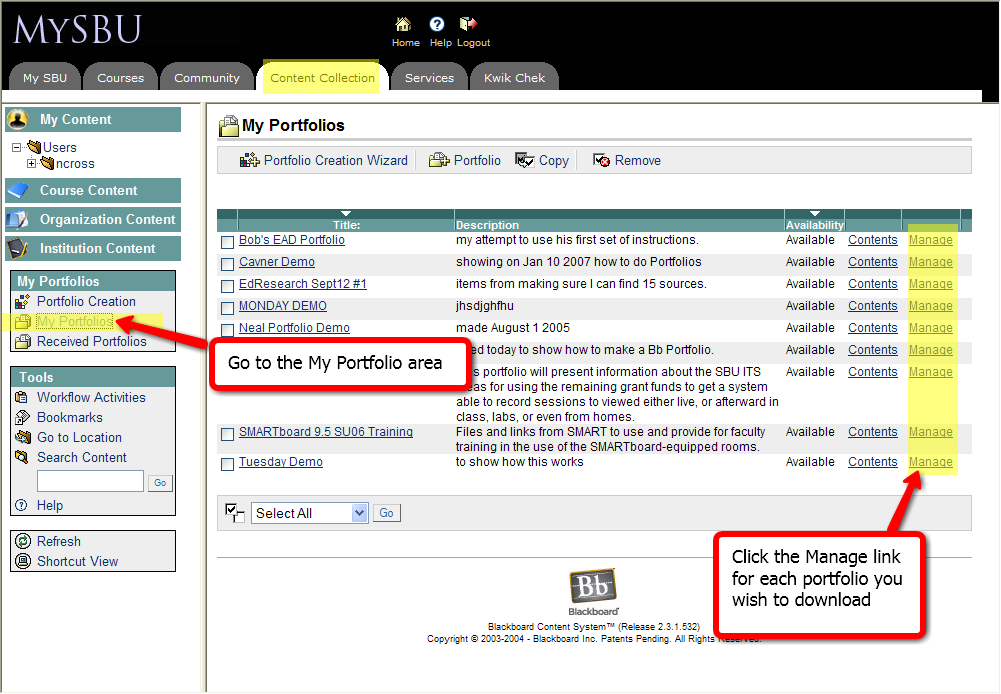
Your list of portfolios will differ from what is shown here, but for each you wish to download, you will have to click the Manage link.
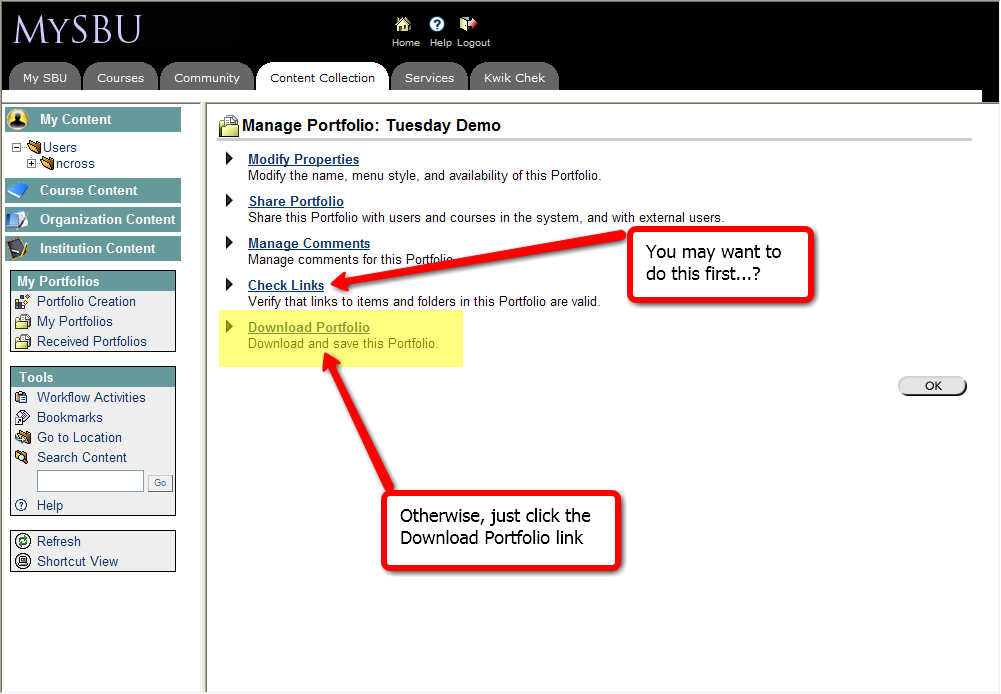
There is an option to Check Links before downloading; if you are not concerned, just go straight to the Download Portfolio link:
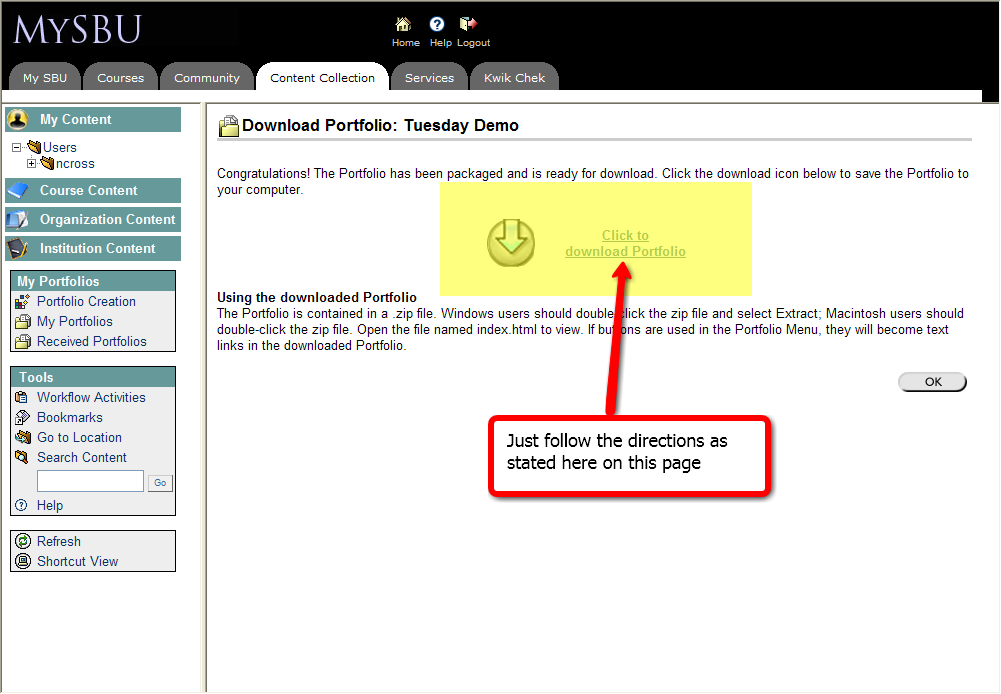
Just follow the on-page directions to start the file download:
Then click the Save button. If you have several portfolios to download, you may want to change the file name as you save them:
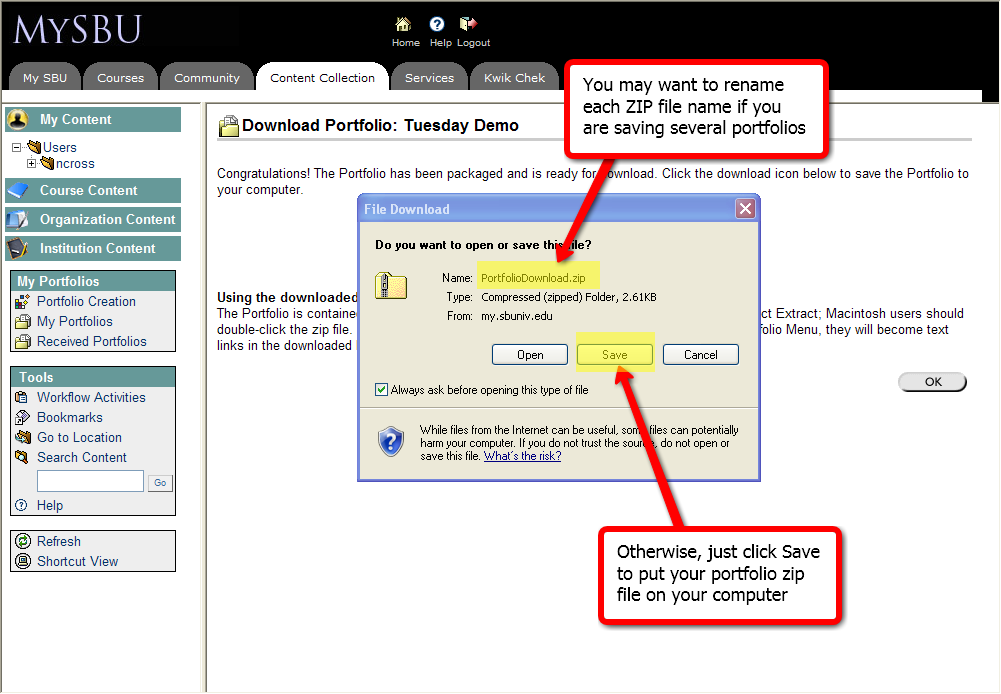
You now have the content from your portfolios. Each ZIP file can be expanded, and the folder this makes can be placed on any web server (such as your F:\public.www area) to be viewed as a web-based portfolio. The only functionality that will not work with this method is Comments.
Monday, May 12, 2008
Getting your files from Content Collection
Looking for a quick and easy way to get all your files from My Content (or Course or Organization)? Login to Blackboard, and go to the Content Collection tab. You should be looking at your My Content area. This image shows this area, and the next steps you will take.

Use the Select All and GO button at the bottom to select all the files and folders you have (one). Then at the top right, change the dropdown menu there to Download Items, then click the GO button next to it (two). You will see a prompt to save a ZIP file like this:

Just save your ZIP to some location on your computer. Go into, or unpackage your ZIP file, after you have downloaded it to confirm your files are there. If you have Course or Organization content, you can do this same process for those files.
Thanks to http://www.jingproject.com/ for their screen capture and sharing technology.
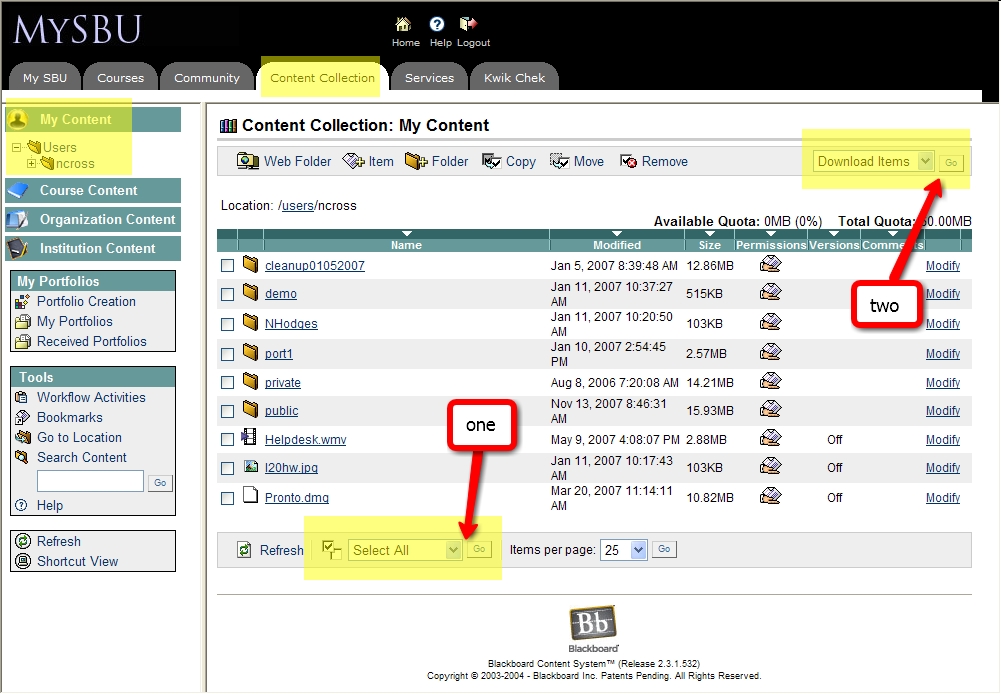
Use the Select All and GO button at the bottom to select all the files and folders you have (one). Then at the top right, change the dropdown menu there to Download Items, then click the GO button next to it (two). You will see a prompt to save a ZIP file like this:
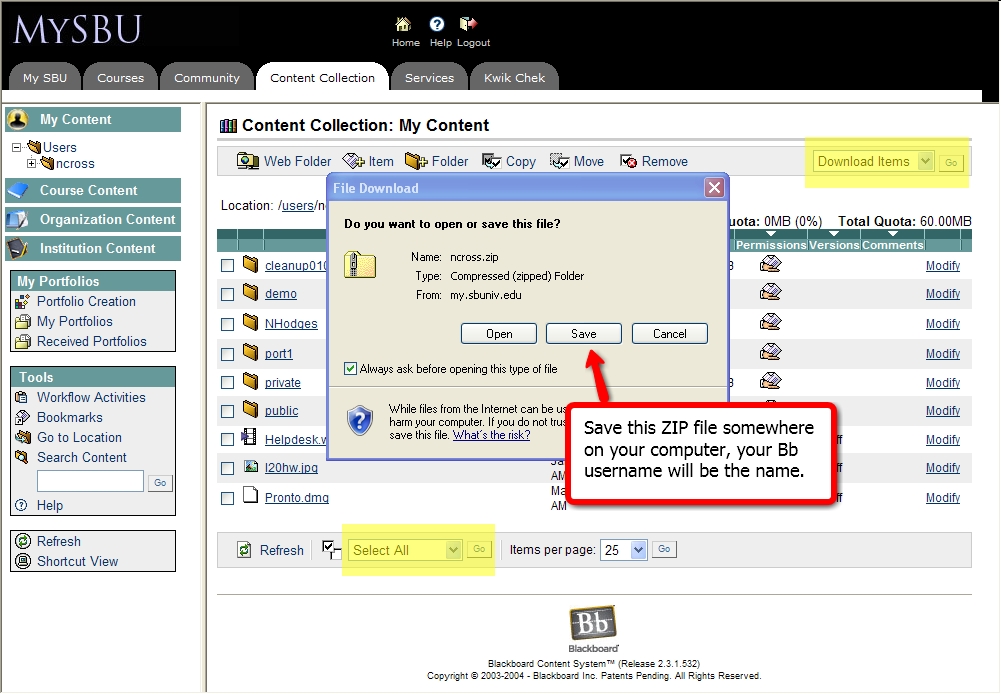
Just save your ZIP to some location on your computer. Go into, or unpackage your ZIP file, after you have downloaded it to confirm your files are there. If you have Course or Organization content, you can do this same process for those files.
Thanks to http://www.jingproject.com/ for their screen capture and sharing technology.
Thursday, May 1, 2008
Why Blackboard to ANGEL?
In my first blog post, I mentioned a transition away from Blackboard (Bb) to ANGEL during the 2008-2009 year. Most of this message will be a timeline that provides some details of where we have been, and also looks ahead to where we going. But before giving that timeline, I’d like to say a few words about Change. Even if we did choose to stay with Bb, there was going to be Change. Our current 6.3 version will no longer be supported in the near future, which would mean moving to versions 7.3 or 8 in the near term, and versions 9 and 10 coming along soon after that. With Change being inevitable, ITS and IT worked with the Faculty Senate Educational Technology committee to investigate the best Change to make. Faculty assemblies held at Springfield and Bolivar in December 2007 provided demonstrations of ANGEL, and the feedback was overwhelmingly positive in favor of a change. With all the information we’ve considered, a move to ANGEL is Change to a better product at half the cost. Now, for the timeline:
May 2008
SBU ITS reps will attend the ANGEL User Conference.
Summer 2008
Initial install and setup of ANGEL with 1000 users will be made. Testing of integration with other SBU systems will be conducted.
Fall 2008
CCTC students begin using ANGEL, faculty training conducted.
Spring 2009
Pilot programs for areas of SBU to use ANGEL for classes will occur. Further training to be conducted as well.
June 1 2009
Blackboard will no longer be used or available.
Summer 2009
First semester that will be fully ANGEL (enabled with 5000 users) for all SBU courses.
Please feel free to make comments on this blog post or, send an e-mail to blackboard@sbuniv.edu
May 2008
SBU ITS reps will attend the ANGEL User Conference.
Summer 2008
Initial install and setup of ANGEL with 1000 users will be made. Testing of integration with other SBU systems will be conducted.
Fall 2008
CCTC students begin using ANGEL, faculty training conducted.
Spring 2009
Pilot programs for areas of SBU to use ANGEL for classes will occur. Further training to be conducted as well.
June 1 2009
Blackboard will no longer be used or available.
Summer 2009
First semester that will be fully ANGEL (enabled with 5000 users) for all SBU courses.
Please feel free to make comments on this blog post or, send an e-mail to blackboard@sbuniv.edu
June 1, 2008 and Blackboard

Community System
No Organizations (as they exist now in Bb).
Short-term: Will use a special category of courses instead in Bb. Will try our best to keep the transition time frame as short as possible.
Long-term: ANGEL has a Community component we will use in the future.
Bb Orgs redone as Bb courses will move to ANGEL when possible.
No Discussion Boards for Prayer Requests and SBU Classifieds.
No Kwik Chek (via Bb).
Alternative methods and means of providing an electronic Kwik Chek are being investigated and considered.
Content System
No file collections (My, Course, Organization, Institution).
Move your My/Course/Org files to F: drives or other locations.
Utilize the Netstorage access method to have web-based access to F: drive files.
Course/Org content needs to be placed in courses directly for Summer-Fall 2008 and JanTerm-Spring 2009 semesters.
G: drive areas for Human Resources and similar Institution content will be utilized.
ANGEL with ePortfolio system will also be utilized in the future.
No Portfolios.
Export those you want to your computer storage options (C:, F:, USB drives, CDs/DVDs).
Can be used/displayed via F:/public.www if needed.
Will be able to use ANGEL ePortfolio.
All this leads to June 1, 2009, when Blackboard will be gone completely.
Please feel free to make comments on this blog post or, send an e-mail to blackboard@sbuniv.edu
Subscribe to:
Posts (Atom)